Connect ChatGPT to Rafter’s MCP server
ChatGPT adds MCP servers through Developer mode. Switch it on once, add Rafter as a connector, and your chats can search the team's shared memory and save decisions back.
Turn on Developer mode
In ChatGPT, open Settings → Security and switch on Developer mode.
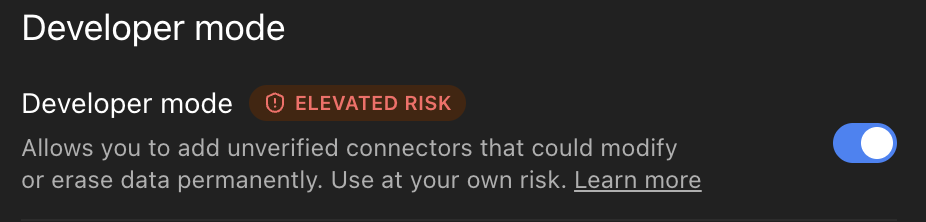
ChatGPT’s own Settings → Security screen. Developer mode is what lets ChatGPT add custom MCP connectors; ChatGPT marks them as elevated risk.
Create the Rafter connector
Create a connector named Rafter with this MCP server URL and OAuth authentication.
https://app.heyrafter.xyz/api/mcp
Sign in and pick a workspace
A Rafter sign-in window opens — Google, GitHub, or an email link. Pick the workspace you want to connect. The connection sees exactly what you can see in that workspace: your teams and your role, nothing more.
Use it in a chat
Start a new chat, enable the Rafter connector from the tools menu, and try “Search our Rafter memory: what did we decide about pricing?”
Your first five minutes
The connection is the easy part. The habit is what pays: make ChatGPT check the shared brain before it improvises. Three things to try in ChatGPT:
- “What do we know about [a client or project]?”Rafter’s search answers from your team’s actual notes — with what they cite.
- “How do we [something a teammate has done before]? Follow the skill if we have one.”Skills are the team’s way of doing it, taught once and reused.
- “Save this as a memory: [a decision you just made].”Written back with add_memory — versioned, searchable, there for the next person.
To make it automatic, paste this line into ChatGPT’s project or system instructions:
Check Rafter first: search our skills and memories before you answer, and save anything durable back with add_memory.
A longer startup prompt and a ready-made Claude Code skill live in the rafter-mcp repo.
Troubleshooting
I don't see Developer mode in my settings
It lives under Settings → Security. If it’s not there, update the app — availability varies by plan and platform.
Why does ChatGPT call the connector “elevated risk”?
ChatGPT labels every custom MCP connector that way, whoever runs it. It means the connector can read what you send to its tools — which is the point: Rafter only sees the queries and memories your chats send it.
Which workspace should I pick when signing in?
The one whose skills and memories you want this tool to see. A connection sees exactly what you can see — your teams and your role — never more. You can connect again later and grant a different workspace.
Is my team's content used to train AI models?
No. Rafter does not use your content to train generalized or foundation models — see the privacy policy.
Give your whole team the same brain.From $29 per user — see pricing.
Create your account